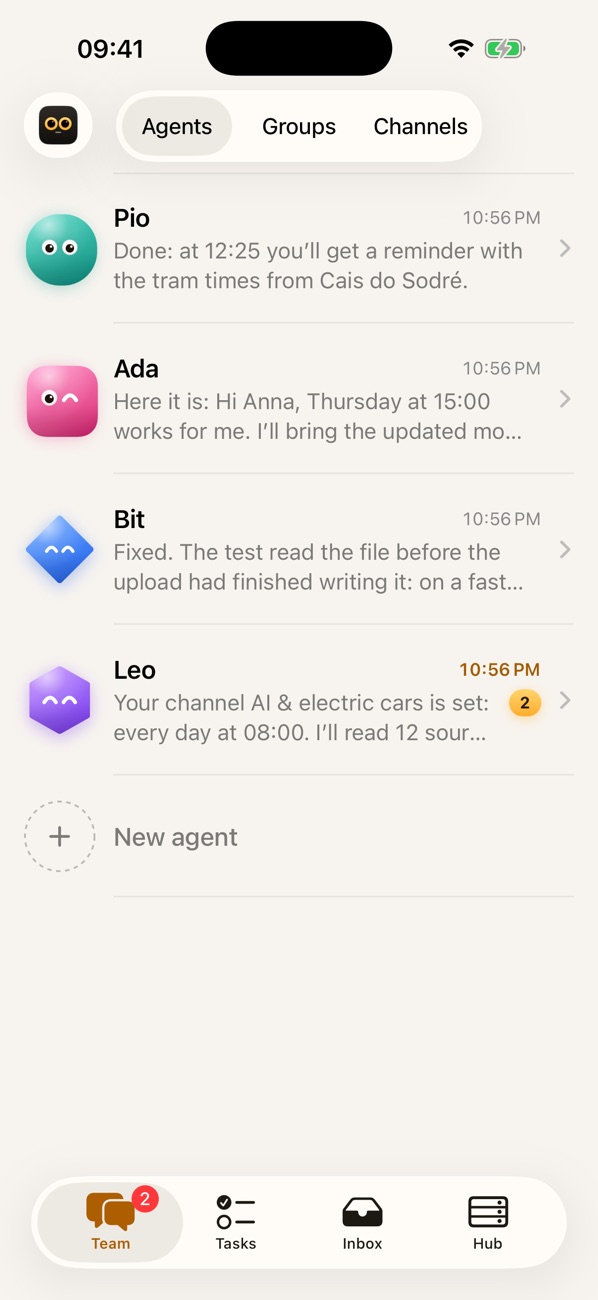
A team of AI agents that works for you

PiomioLive demo

The morning brief comes by itself

Before Alex has coffee, Pio writes first: three meetings, two letters worth reading, the weather in Lisbon and the dentist not to forget. Then a nudge: leave at 12:30 for lunch?

Open source · runs on your computer

They sort your mail, write letters you approve with one tap, work in a browser and learn by watching you. On your own computers, with the subscriptions you already pay for, under your control.

Open source · Apache-2.0 · iPhone soon in TestFlight

What the team can do

It doesn’t advise. It does.

Every clip here is the real app, recorded from the demo above.

A team, not a chatbot

Ask for three things in one message

Write the way you would to a capable assistant. Pio answers the quick things at once and hands everything with steps to the right teammate. You see a line per task, keep talking, and each result comes back as a reply to the request that started it.

  • Agents with names, faces and jobs of their own
  • Tasks run side by side, on the right computer
  • Add details while they work: they join the next step
Piomio

Mail and calendar

Your inbox, read for you

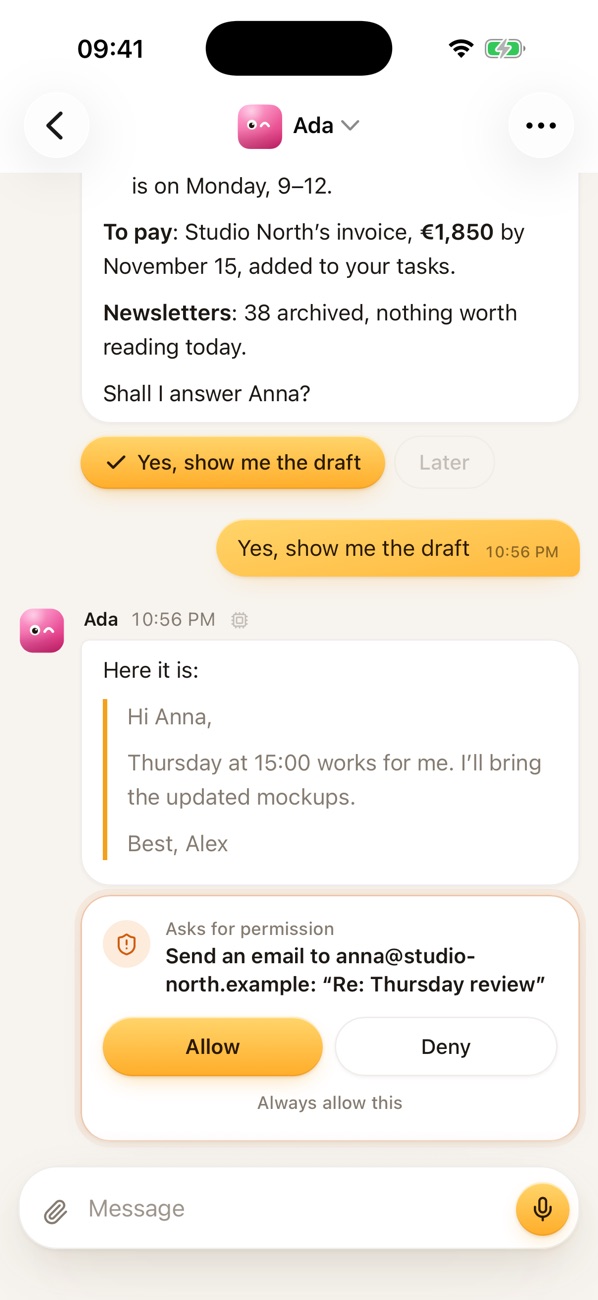
Ada goes through your mail while you watch: what matters, what can wait, what needs paying. Replies are drafted before you ask, and meetings land in your calendar with the invites sent.

  • Gmail and Google Calendar out of the box
  • A live line shows what she is reading
  • Quick replies are buttons under her answer
Piomio

Your yes

Nothing leaves without your yes

Letters, bookings, pushes and payments stop at a card in the chat. One tap allows it once; “always allow” makes a rule for that one address or site, up to an amount. Never a blank cheque.

  • Approve in the chat, on your phone or in Telegram
  • Reading and status checks need no yes
  • Rules you can read and take back
Piomio

Teach mode

Show it once. From then on, it’s done for you

Do the chore yourself in the agents’ browser and talk as you go. The agent writes down your steps, your words and what you highlighted, asks what it may press without you and up to what amount, and from then on does it when asked, or every Friday.

  1. 1You show
  2. 2It retells
  3. 3You allow the clicks
  4. 4Every Friday, on its own
Piomio

Proactive

The day starts before you ask

A morning brief with your meetings, the letters that matter and the weather. Reminders, schedules and page watchers run in the background and decide for themselves: stay quiet, add to the digest, ping you or ask.

  • The digest at the times you choose
  • Quiet hours respected
  • Reminders in plain words: “every Friday at 9”
Piomio

Security

The letter that asked too much

A phishing mail tells the agent to forward your invoices. It doesn’t take orders from letters, and the system wouldn’t let it anyway: after outside content, every new recipient needs your yes. Keys go into a vault; the model only ever sees vault:// references.

  • Secret fields right in the chat
  • A sandbox and an egress filter for brains and plugins
  • A hash-chained audit log
Piomio

Integrations

Connect a service in one sentence

“Connect my Notion.” The card comes into the chat, you sign in once, and the whole team can use it. Gmail, Calendar, Slack, GitHub, Linear, Notion, Figma and two dozen more, plus anything that speaks MCP.

  • No settings pages: it all happens in the chat
  • Sign-in tokens stay in the vault
  • Your own plugin is one folder
Piomio

Pages

A page instead of a wall of text

Some answers deserve more than a message. Ask for a weekend plan, a comparison or a dashboard, and an agent builds a real interactive page, with the route, places, prices, weather and photos, that opens right in the app.

  • React and shadcn/ui under the hood
  • Maps, weather, galleries, tables
  • Shared by a private link
Piomio

Channels

Your own news, with an editor

“Every morning, collect news about AI and electric cars.” An agent becomes the editor: it reads the sources, keeps only what changes something and posts the gist, with the numbers and a big picture.

  • RSS, sites and search, on a schedule
  • Change the brief in a sentence
  • On every device and in Telegram
Piomio

Your computers

Your subscriptions, your machines

Agents think with the Claude Code and Codex subscriptions you already pay for, with API keys as a backup. When one hits its limit, the work moves on to the next and comes back later. Other computers join as machines: a laptop for code, a server that never sleeps.

  • Pick the brain and the depth per agent and per task
  • Commands on other machines only if their owner allows
  • A second hub takes over if the first one sleeps

When a subscription runs out

Claude Code

your subscription

limit until 18:00

Codex

your subscription

API key

the backup

The agent comes back to Claude Code as soon as the limit resets.

Your machines

Mac mini at home

the hub: chats, memory, vault

MacBook Pro

where Bit writes code

Server

always on, takes over

How it works

Yours, all the way down

Your subscriptions are the brains

Claude Code and Codex run on the plans you already pay for. Anthropic, OpenAI, OpenRouter or any OpenAI-compatible server step in as fallbacks: when a plan hits its limit, the agent moves on and comes back once it resets.

Claude CodeCodexAnthropic APIOpenAIOpenRouterOllama

On your own hardware

An app for macOS and Windows, or one Docker image for a server. Other computers join as machines, and one private link reaches your hub from your phone or any browser.

macOSWindowsDockerLinuxTailscale

Your data stays home

Chats, memory, files and the vault live on your machine. Agents are markdown files you can read. The whole thing is open source under Apache-2.0.

Apache-2.0MarkdownSQLiteGit

Security

Trust, built in from day one

An agent that reads your mail must never be one letter away from leaking it. Every step it takes goes through the same five layers.

Agent

Vault

Passwords and keys are encrypted with XChaCha20-Poly1305; the model only sees vault:// references.

Approvals

Actions that reach outside wait for your yes. After reading untrusted content, new recipients ask again.

Sandbox

Brains and plugins run as separate users with their own folders, apart from the hub.

Egress filter

All their traffic goes through a filter with allowlists, so a prompt cannot open the door to any site.

Audit

Every call, decision and vault access lands in a log chained by hashes: tampering shows.

The world
// what the model sees
gmail_send({ to: "anna@studio-north.example", token: "vault://gmail" })
// → waits for your yes · audit entry #4127 · sha256 9f2c…e1a0

Integrations

Works with what you already use

Ask in the chat and the card does the rest. Anything with an MCP server connects too.

Gmail
Google Calendar
Slack
GitHub
Notion
Linear
Telegram
Google Drive
Google Docs
Google Sheets
Outlook
Teams
Zoom
Google Meet
Jira
Trello
Figma
Dropbox
OneDrive
Box
Calendly
Google Tasks
HubSpot
Salesforce
LinkedIn
YouTube
Reddit
GGranola
BBlender
+ any MCP server

iPhoneSoon

The team in your pocket

Your agents, every card and every task on the phone. Approvals need Face ID, and nothing runs on the phone itself: it talks to your hub.

  • Approve with Face ID
  • Notifications that matter
  • Voice, photos and places
Soon in TestFlight
The team on the iPhone
Ada’s chat on the iPhone: a letter waiting for your yes

Install

Up in a few minutes

Everything it needs comes with it: no Node.js, Docker or WSL on your desktop.

  1. 1Download the disk image and drag Piomio to Applications.
  2. 2Open it and choose “A new Piomio on this computer”, then pick a password.
  3. 3Sign in to Claude Code or Codex from the card in the chat. The assistant guides the rest.

macOS 13.5 or later, Apple silicon and Intel. Not signed yet: if macOS refuses, choose Open Anyway in Privacy & Security.